
|
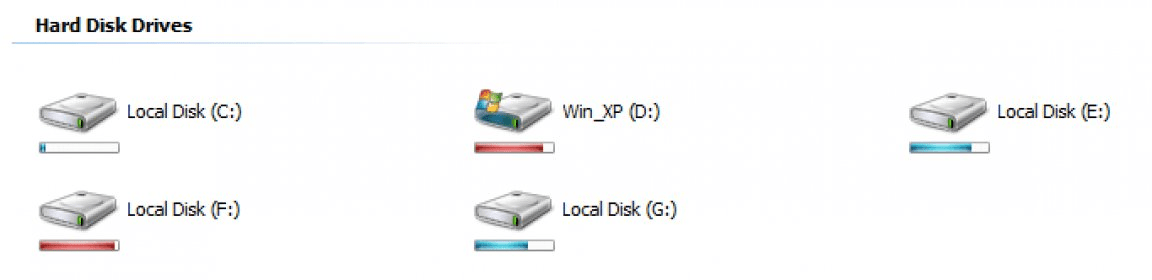
Are you using the Windows operating system older then Window Vista? If yes, then it means you have just dead icons for your drives, which does not provide you with any information about used space and free space in the drives. But here is an opportunity for you to get Window Vista style icons, which not only have modern stylish look but also tell you about consumed and free space of drives.
|
|
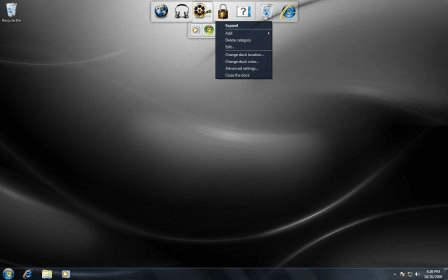
One of the new features of Windows Vista was its sidebar, a vertical bar that holds a group of applications called gadgets, those gadgets offers us a quick access to different tools or functions that may be useful on our daily duties.
Microsoft included a little list of gadgets with their sidebar, however there are much more available on vistagallery.microsoft.com.
|
|
iColorFolder will speed-up your computer work! Why? Many folders in one directory can be a problem, especially when it comes to searching for a particular folder in a hurry. Having color-coded folders makes it much easier to find the needed one and you don’t waste your time at unnecessary search
|
|
IconPackager for ObjectDesktop, as the name itself suggests, provides you with a package of attractive icons all ready to decorate your desktop with a fresh new look.
Change the look and feel of your desktop icons with this amazing tool. This tool comprises a package of icons and is able to change or replace hundreds of icons on your Windows.
|
|
Dell includes preinstalled on their lastest portables dock program by Stardock that offer basic dock functionality and a lot of limitations.
The first impression you get running the application is the lack of effort from Dell to make their dock experience at least similar to stardock freeware.
|
|
This miniature tool integrates with your explorer, desktop and with most of the software. It always appears on the desktop and with just simple right click you are able to access all its features. All the basic effects of the application are based on the plugins for its complete customization and addition of new effects.
|
|
Desktop Icon Toy is a cool program that helps you to organize and place the icons on your desktop any way you want. Besides the possibility to arrange you icons in the style the program offers, you can create your own layouts and save them. Also the icons' text or the icons themselves can be set to be hidden when we go off the desktop (or when the focus is on another window).
|
|
IconTweaker 1.12.2648 is a freeware application that allows you to customize all your Windows icons.
You would want to customize them to make your desktop look better and improve the usability, making easier to recognize items.
You can share your icons with others, and use other people´s creations. It has many themes included.
|
|
BeeIcons 4.0.3 is a powerful icon-changing tool. Among more than 250 icon themes you can find the one that matches your mood. The “Quick Learning” option offers you the survey of the program showing the main options. It is possible to change all icons on your PC by applying icon themes or to change icons of individual discs and folders.
|
|
Vista Shortcut Manager is a small utility to remove/manage the arrow symbol on your icons and either remove them or replace them with some other custom graphic, you can also remove that shortcut to prefix in the text of any shortcut that windows makes.
|
|
My Folder 1.0.0.0 changes the folder icons in Windows.
After installing the program, you can click on a folder with the mouse´s right button and change the folder icon with one of the alternatives that the program offers (colors, event, level, priority, object).
|
|
FolderIcon XP is a simple application that allows you to easily change the icon for any folder with just a few clicks. Now, with FolderIcon XP you will be able to mark important folders, organize your data, and select one out of 129 professionally designed XP-style icons (colored, numbered, marked folders) or use any external icon.
|
|
Iconoid is a handy application that allows you to manage and arrange your icons in a simple and fun way. This easy to use program enables you to hide and show desktop icons dynamically, change text colors, remove the text backgrounds, save and restore icon positions, and quickly hide windows.
|
|
All those persons who love colors are normally want an attractive computer with colorful icons. And normal icons of windows are not so attractive therefore mostly persons want to change them with their own icons. But to create your own icons you will require Icon Constructor. And here is your superior quality Icon Constructor.
|
|
IconArt is a highly compact cursor and icon creator that allows you to draw an image from scratch using all common tools or to import an image to turn into a icon or cursor. The application includes a gradient color tool, detailed colour pallet options, and a tool that enables you to save multiple icon images in the same *.ico file.
|
|
Lovely Folders is a collection of stylish and exotic icons that can give your ordinary folders a brand new look. Lovely Folders can customize every single folder of your operating system excluding the sub folders. You can choose a folder icon among more than 1000 stylish icons.
|
|
LabelsWin Lite is a unique tool that allows you to create colorful labels for folder icons. This application was developed for Windows Explorer and makes your interface more attractive and handy and your work more pleasant.
This program is fully integrated with Windows Explorer.
|
|
Shock Desktop is a desktop tool that enables user to arrange the existing icons and change their locations.
The application allows setting different icons positions, saving them and recovering them later. Icons and labels can be hidden and shown.
The program enables saving a given desktop icons location and restore it when calling the profile, even if they have changed their actual positions.
|
|
IconRestorer is a powerful and handy tool that allows you to backup and restore the icons position on desktop in a snap. As you know, or not, the position of icons on your desktop or the screen resolution can be altered due to a system crash. This program avoids you the trouble of manual restoring the icons to their original positions, thus saving you valuable time.
|
|
IconCool Editor can create and edit icons for Windows XP in 32-bit color depth with an alpha channel. Now, you can easily create wonderful, semi-transparent XP icons. IconCool Editor can extract icons from EXE, DLL, ICL and other files, and send the extracted icons to the edit area, then save them back. IconCool Editor can edit 10 icons at the same time.
IconCool Editor has begun to support the
|
|
ActivIcons is a comprehensive and easy to use application that allows you to change your Windows desktop's default icons and cursors properties in a snap. This program enables you to save and restore the desktop layout, rebuild the icon cache or increase its size, remove shortcut symbols, repair corrupted icons, and much more.
|
|
Change Folder Icons is a simple utility that enables you change all your standard folder icons by original ones already present in your computer. The application makes a complete scan of your PC searching for icons, which can be paused or stopped at any time, and shows the results on its main window.
|
|
Enterra Icon Keeper is a program to save and restore the icon layout on your desktop. Each time the screen resolution changes, the icons in your desktop become disarranged. Enterra Icon Keeper eases the process of getting them back to their positions.
|
|
This handy freeware is aimed to help you preview Flash movie files using standard Windows Explorer. Scan directories and subdirectories for Flash, create and view thumbnails for SWF and Projector EXE and see file information directly in your Explorer
|
|
FolderMagic is a shareware application that makes it possible to add lively colors and icons to our otherwise dull computer directory tree and desktop. There are two options to customize our files, folders, programs, etc. The first option lets us change colors. The second option allows us to change the standard Windows icons.
|